Catch design drift before it ships.

Fidel checks your live pages against your design system, a Figma frame, or another URL, then shows exactly where the UI drifted: spacing, type, color, and layout.

$29 one-time. Includes your first 3 months when we open.

‹ ›
Font weight · heading
spec300
actual500
Spacing · heading gap
spec24px
actual6px
Built for

Built for teams shipping web UI.

Frontend developers

Check your UI before you merge. Catch spacing, color, and layout drift against your design system or a Figma frame.

QA engineers

Catch drift before release. Get a list ranked by severity instead of eyeballing every page.

Product designers

Objective results instead of subjective sign-offs. Share exactly what drifted with the team.

Design system teams

Check that shipped components still follow your design system. Spot token and property drift on any live page.

Common use cases

Catch what manual review misses.

One tool, whether your source of truth is a design system, a Figma frame, or another deploy.

01

Pre-merge check

Run a check on your preview deploy before it merges. Catch spacing, color, and layout drift before it reaches production.

02

Design-system compliance

Confirm shipped components still follow your design system. Catch token and property drift on any live page.

03

Figma handoff QA

Compare the build against the frame your designer handed off, property by property.

04

Staging vs production

Compare two URLs to see what changed between deploys. No design file needed.

05

Catch drift from any source

Hand-written code, a quick fix, or AI-generated UI: it all drifts from the design over time. Fidel catches what slipped through, whoever wrote it.

Before and after

From manual back-and-forth to one check.

Checking a build against the design today means screenshots, mark-ups, and a comment thread that runs for days. Fidel does it in one pass.

Today

Checking by hand

1Screenshot the design and the live page.
2Mark up every difference by hand.
3Send it back in a comment thread.
4Wait for a reply, then re-check the fix.
With Fidel
One automated check

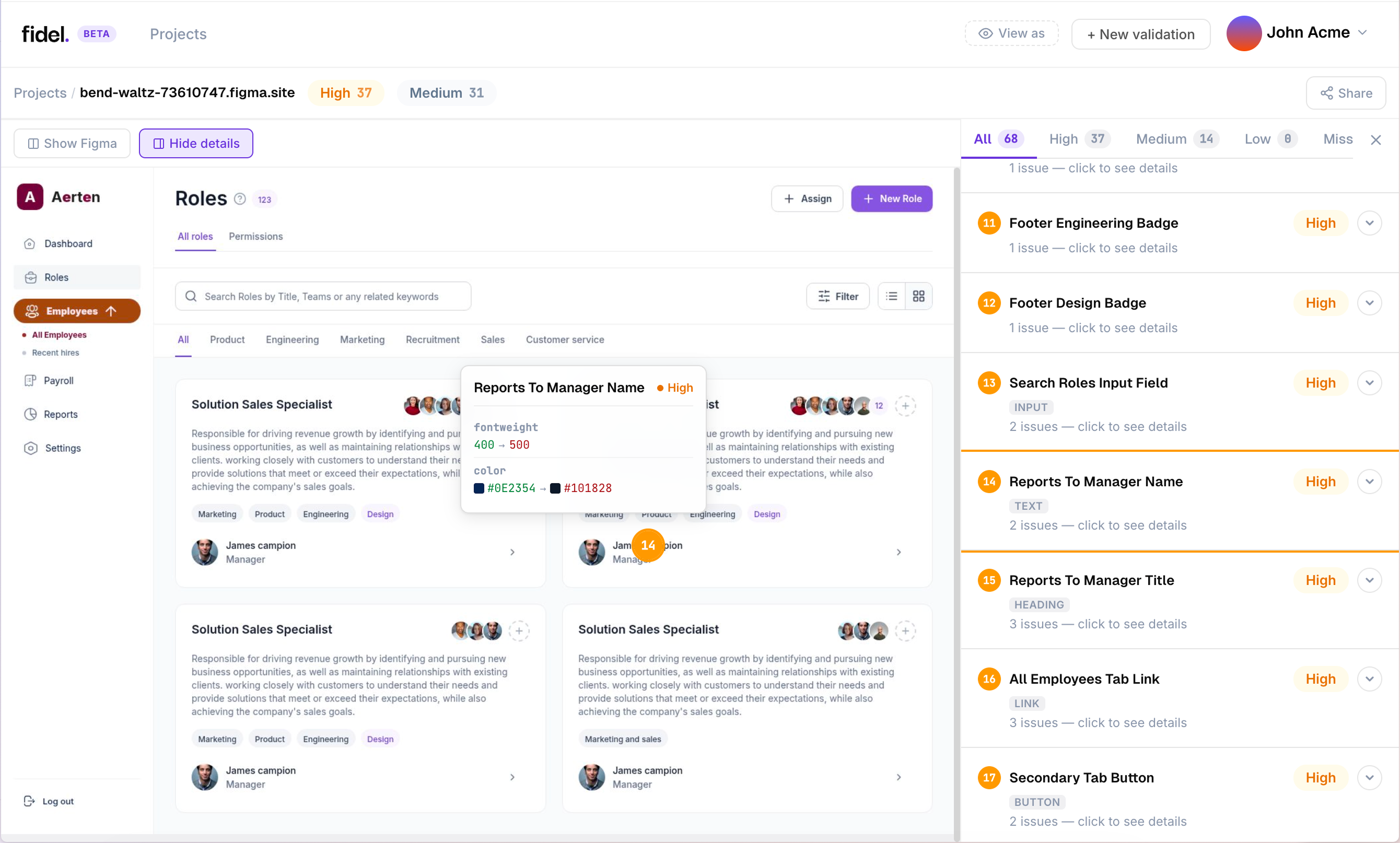
Fidel report showing a live web page with design differences annotated and ranked by severity

Every difference found, ranked by severity, with the expected value. One report you can share as a link.

How it works

Four steps to a checked build.

Connect a source of truth, point at your page, get a ranked list of what drifted.

01

Connect your source of truth

Your design system, a Figma frame, or another URL. Connect Figma securely in one click.

02

Point at your live page

Staging, localhost, a preview deploy, or production. Any page a browser can open.

03

Get a ranked report

Exactly what drifted, ranked by severity, with the expected value and annotated screenshots.

04

Share it, or add it to CI

Send a public link, or add one check to your pipeline so every pull request gets reviewed.

Not visual regression

Compared against the design, not yesterday's screenshot.

Visual regression compares your UI against a previous screenshot. If the last build was already wrong, the new one passes. Fidel compares against your design system or Figma design, so it catches what doesn't match the intended design, not just what changed.

That means Fidel works from your first deploy. No baseline to capture, no test suite to maintain. Connect a source, point at a URL, and get results.

Regression"Something changed since last time."
Fidel"This doesn't match the design, and here's the expected value."
SetupNo baseline, no test suite, no CI required to start.
In your pipeline

One check, every pull request.

Add Fidel to your workflow once. It reviews each pull request against your design and posts what drifted right on the PR.

Fidel running a design-system check on a live page, comparing rendered values against the design tokens
Design system mode

Validate app.acme.com against your tokens.

Checking

Comparing 214 rendered values to tokens
Violations
backgroundbg-surface#0B0F1A
colortext-muted#8A93A7
paddingspace-418px
Testimonials

Don't take our word for it.

01 / 02
"Our QA used to take 2 to 3 weeks. This finished in 2 minutes."
MartinsFounder, Dinesurf

Frequently asked questions

Visual regression compares a build against an earlier screenshot, so if the last build was already off, the new one passes. Fidel compares the rendered page against your design system or Figma design, so it catches what doesn't match the intended design, not just what changed.

Three sources of truth: your design system connected from your repo, any Figma frame you can access, or another URL. Use whichever is the source of truth for a given page.

For Figma and URL checks, no. Fidel works from a design frame and a live URL and never needs your application source. For design-system checks, it reads the design tokens and component definitions from the repo you connect, not your application code.

Spacing, typography, color, layout, borders, radii, and more: over 20 rendered CSS properties per element. Color is compared the way the eye sees it, so close-but-wrong shades still get caught.

Reserve your founding spot.

$29 one-time, with your first 3 months included when we open. See exactly what drifted, ranked by severity.

Get early access